

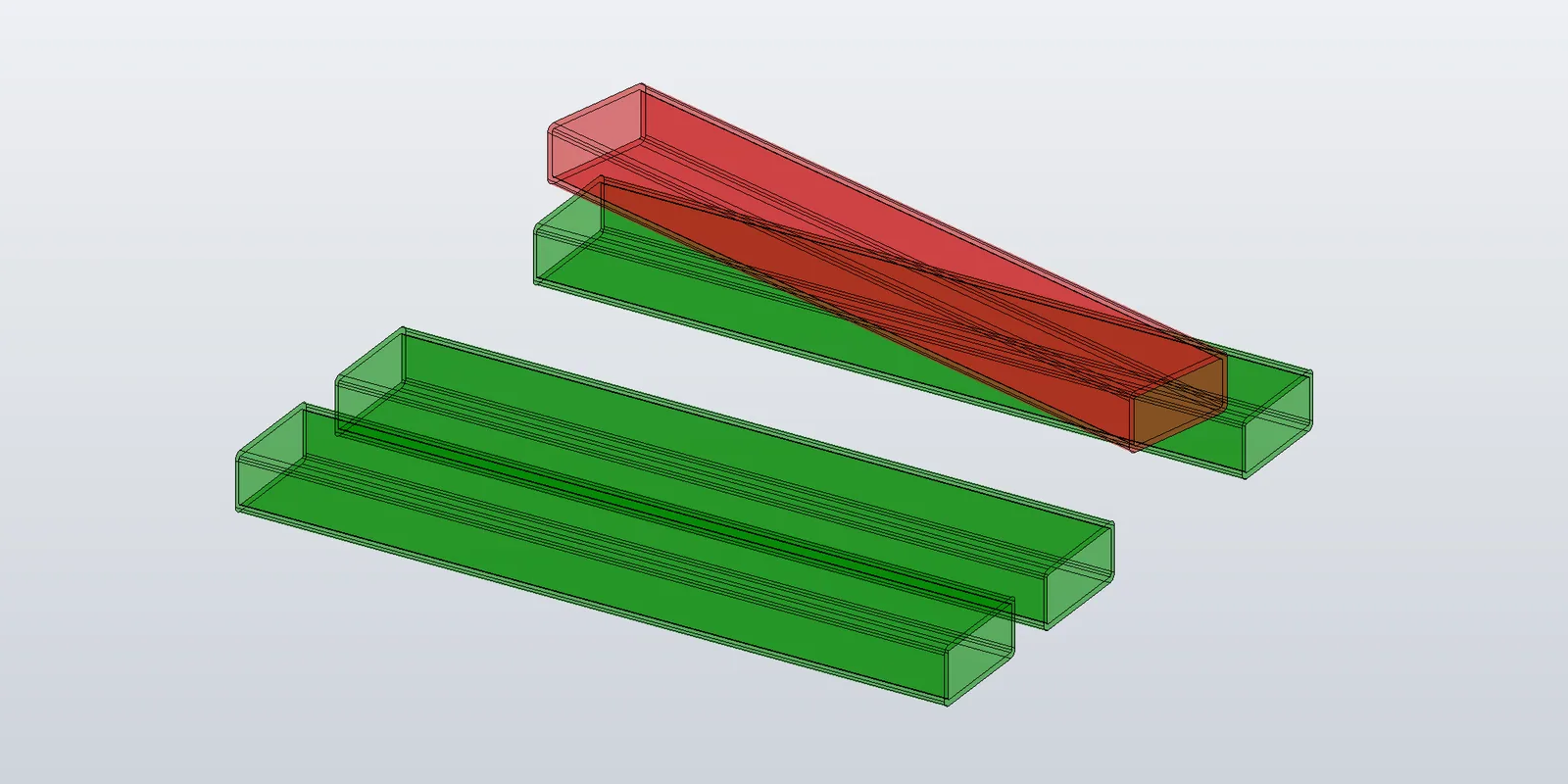
The pattern at the end of the previous post — delete the node, build a new SurfaceBody, add a new node — is fine for slow updates. For interactive previews, where the user is dragging a slider or scrubbing a value, rebuilding geometry on every change is expensive enough to see.
Two changes to the simple pattern handle most cases:
- Track nodes by a stable key. When an input changes, replace just the affected node. Untouched nodes keep their geometry and graphics objects.
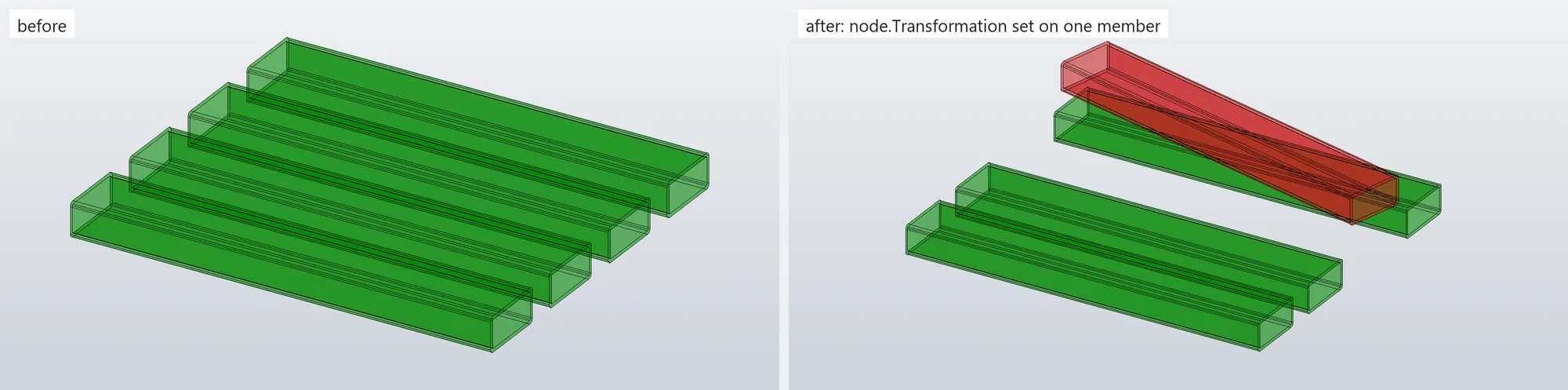
- Transform-only updates. When only the placement changed — the beam moved, didn't reshape — set
node.Transformationto a new matrix and skip the rebuild.
Both live in a small preview manager that owns one ClientGraphics.
The manager
public sealed class Post08_PreviewGraphics(Inventor.Application app, ClientGraphics clientGraphics)
{
    private readonly Dictionary<string, GraphicsNode> _nodesByKey = new();
    private readonly Dictionary<string, string> _contentHashByKey = new();
    private int _nextNodeId = 1;
    private int _updateDepth;

    private TransientObjects To => app.TransientObjects;

    public void AddOrReplace(string key, SurfaceBody body, Color? color = null)
    {
        Remove(key, refresh: false);

        var node = clientGraphics.AddNode(_nextNodeId++);
        node.Selectable = true;

        var surface = node.AddSurfaceGraphics(body);
        surface.Color = color ?? To.CreateColor(0, 135, 0, 0.35);

        var edgeColor = To.CreateColor(0, 0, 0);
        for (int i = 1; i <= surface.DisplayedEdges.Count; i++)
            surface.DisplayedEdges[i].Color = edgeColor;

        _nodesByKey[key] = node;
        Refresh();
    }

    public void Remove(string key, bool refresh = true)
    {
        if (!_nodesByKey.TryGetValue(key, out var existing))
            return;

        try { existing.Delete(); } catch (System.Runtime.InteropServices.COMException) { /* host already gone */ }
        _nodesByKey.Remove(key);
        _contentHashByKey.Remove(key);
        if (refresh) Refresh();
    }

    private void Refresh()
    {
        if (_updateDepth == 0) app.ActiveView.Update();
    }
}
The key is whatever stable string identifies the previewed thing — a beam id, an index, anything that stays the same while its inputs change. _nextNodeId is a counter that only goes up. Node ids in a ClientGraphics don't have to be contiguous, and reusing one is exactly what to avoid: as the previous post showed, AddNode with an id that is already in use adds a second node with that id instead of replacing the first.
Transform-only updates
When the beam was moved or rotated but its cross-section, length and end cuts are unchanged, the existing SurfaceBody and GraphicsNode are still right — only the node's transformation changes:
public bool Transform(string key, Matrix transform)
{
    if (!_nodesByKey.TryGetValue(key, out var node))
        return false;

    node.Transformation = transform;
    Refresh();
    return true;
}
Setting Transformation leaves the body and its SurfaceGraphics as they are; only the node's matrix changes. In the capture in the previous post, the red beam is the green one's body copied with TransientBRep.Copy and moved 14 cm along X this way.
The matrix applies to the body as it was built, wherever that was: the demo builds four members side by side and rotates and lifts one of them about its own start point. Building every body in one canonical pose — say the centerline from the origin along +Z, which the straight and angled-end builders from earlier in the series produce when given start = (0,0,0) and direction = ZAxis — makes the matrix easier to work with, because it is then the member's whole placement in the world rather than a correction to where it happened to be built. Changes that alter shape (length, profile, cuts) rebuild through AddOrReplace; changes that only alter placement go through Transform.
Coalescing viewport updates
View.Update() after every node adds up when a batch touches many nodes. The manager gets its own BeginUpdate / EndUpdate pair — not Inventor methods — that defers the redraw to the end of the batch:
public void BeginUpdate() => _updateDepth++;

public void EndUpdate()
{
    _updateDepth--;
    if (_updateDepth == 0) app.ActiveView.Update();
}

// Usage:
preview.BeginUpdate();
try
{
    foreach (var beam in changedBeams)
        preview.AddOrReplace(beam.Key, BuildBeamBody(beam), beam.Color);
}
finally
{
    preview.EndUpdate();
}
AddOrReplace, Remove and Transform all go through Refresh(), which skips the update while _updateDepth > 0; the outer EndUpdate issues the single one. The try / finally keeps the depth from getting stuck above zero if a rebuild throws part-way through.
Skip when unchanged
A cascade that says "rebuild every beam" often includes beams whose inputs didn't actually change. A content hash per key catches those:
public void AddOrReplaceIfChanged(string key, string contentHash, Func<SurfaceBody> build, Color? color = null)
{
    if (_contentHashByKey.TryGetValue(key, out var existing) && existing == contentHash)
        return;

    AddOrReplace(key, build(), color);
    _contentHashByKey[key] = contentHash;
}
contentHash is any cheap, stable digest of the inputs that produce the body — a concatenation of the relevant fields is enough. build runs only on a miss.
Cleanup
Any path that ends the preview — OK, cancel, an error — goes through one Clear():
public void Clear()
{
    foreach (var node in _nodesByKey.Values)
    {
        try { node.Delete(); } catch (System.Runtime.InteropServices.COMException) { }
    }
    _nodesByKey.Clear();
    _contentHashByKey.Clear();
    try { app.ActiveView.Update(); } catch (System.Runtime.InteropServices.COMException) { }
}
The catch around Delete() is for the case where the host ClientGraphics is already gone (an InteractionGraphics whose session ended): the node's COM object is invalid and Delete() throws.
None of this is beam-specific. The key tracking, transform path and batching apply to any client-graphics preview where some inputs change shape and others change placement; the beam builder is just what produces the body.
The code in this post — the preview manager — is in the sample repository at github.com/Bas-Automation-Services/TransientGraphicsSamples (Post08_PreviewGraphics.cs). dotnet run --project src/TransientGraphics.Demo -- 8 draws four key-tracked members and moves one with a node transform.
The last post is the curved beam: the centerline becomes an arc, and the side faces become cylinders, cones, tori and one B-spline surface.