

The SurfaceBody from the previous posts is in memory but not on screen. This post is the bridge from body to viewport: colour, transparency, edges.
A preview lives in client graphics — a separate API from the document's modelling tree. Graphics added through it don't appear in the browser, don't go into the undo stack (with the right host, see below), and don't survive a save-close-reopen. They exist as long as the host that owns them does.
There are two hosts that can own client graphics:
InteractionGraphicslives on anInteractionEventsobject during a command's interaction session. It has twoClientGraphicscollections,PreviewClientGraphicsandOverlayClientGraphics: preview takes part in depth testing (faces behind model geometry are hidden), overlay draws on top of everything. This is the host for previews that go away when the command finishes or is cancelled.ClientGraphicsCollectionon aComponentDefinition(PartComponentDefinition.ClientGraphicsCollection, and the assembly equivalent) persists across commands.Add(clientId)creates a collection that takes part in transactions — every node and primitive added to it is an undo entry;AddNonTransacting(clientId)creates one that doesn't, which is what a preview wants. (Neither marks the document modified; the post that set upBaseGraphicshas the measurements.)BaseGraphicsowns one of these.
Both hand out a ClientGraphics instance, and everything below works the same on either.
The graphics tree
ClientGraphics
└── GraphicsNode               (one per logically-grouped element)
    ├── SurfaceGraphics        (renders a SurfaceBody)
    └── CurveGraphics          (renders a curve, e.g. a body edge)
GraphicsNode is the unit of selection, transformation and lifecycle. It has an integer id chosen by the caller, a Selectable flag, a Transformation matrix, and the SurfaceGraphics / CurveGraphics entries inside it. A beam preview is one node per beam.
A working preview
Given a ClientGraphics and a body:
public static GraphicsNode AddPreview(
    ClientGraphics clientGraphics, TransientObjects transientObjects, SurfaceBody body,
    Color? surfaceColor = null)
{
    // Node ids must be unique within the ClientGraphics; pick one above every existing node.
    int nextId = 1;
    foreach (GraphicsNode existing in clientGraphics)
        if (existing.Id >= nextId) nextId = existing.Id + 1;

    var node = clientGraphics.AddNode(nextId);
    node.Selectable = true;

    var surface = node.AddSurfaceGraphics(body);
    surface.Color = surfaceColor ?? transientObjects.CreateColor(0, 135, 0, 0.35);

    // Edges in black, via the surface's own displayed edges (one graphics object per node).
    var edgeColor = transientObjects.CreateColor(0, 0, 0);
    for (int i = 1; i <= surface.DisplayedEdges.Count; i++)
        surface.DisplayedEdges[i].Color = edgeColor;

    return node;
}
followed by a View.Update() on the view that should show it. Four details:
Node ids. AddNode(id) with an id that is already in use does not throw and does not replace the existing node — it adds a second node with the same id (the collection's Count goes up). ItemById is then ambiguous. The "look at existing nodes and pick max + 1" loop above avoids that — it is the same loop as BaseGraphics.CreateNewGraphicsNode; the next post replaces it with a counter.
CreateColor(red, green, blue, opacity). The fourth argument is opacity in 0–1. Green at 0.35 reads as a preview without hiding what is behind it; the same shape in red is the usual cue for an invalid placement.
DisplayedEdges. SurfaceGraphics.DisplayedEdges is a collection of SurfaceGraphicsEdge, one per body edge the surface renders. Setting Color on each gives the outlined look with a single graphics object per node.
View.Update() flushes graphics changes to the viewport. Without it, additions appear at the next redraw (a camera move, a resize). Application.ActiveView.Update() is the usual call; if the preview's document isn't the active one, document.Views[1].Update() targets its view directly.
Per-edge CurveGraphics
The alternative to DisplayedEdges is one CurveGraphics per body edge:
var edgeColor = transientObjects.CreateColor(0, 0, 0);
foreach (Edge edge in body.Edges)
{
    var curve = node.AddCurveGraphics(edge.Geometry);
    curve.Color = edgeColor;
}
Same look, one graphics object per edge instead of one per node. It is the option to reach for when individual edges need different colours (say, the trim edges from the previous post in a highlight colour); otherwise DisplayedEdges is less to manage.
What it looks like
The 30°-mitred RHS from the previous post and a CHS, added to a part document's non-transacting collection with AddPreview; the red beam is a copy of the RHS moved sideways with a node transform (next post):
var cg = partDoc.ComponentDefinition.ClientGraphicsCollection.AddNonTransacting("MyAddin.Preview");
AddPreview(cg, app.TransientObjects, rhsBody);
AddPreview(cg, app.TransientObjects, chsBody);
partDoc.Views[1].Update();
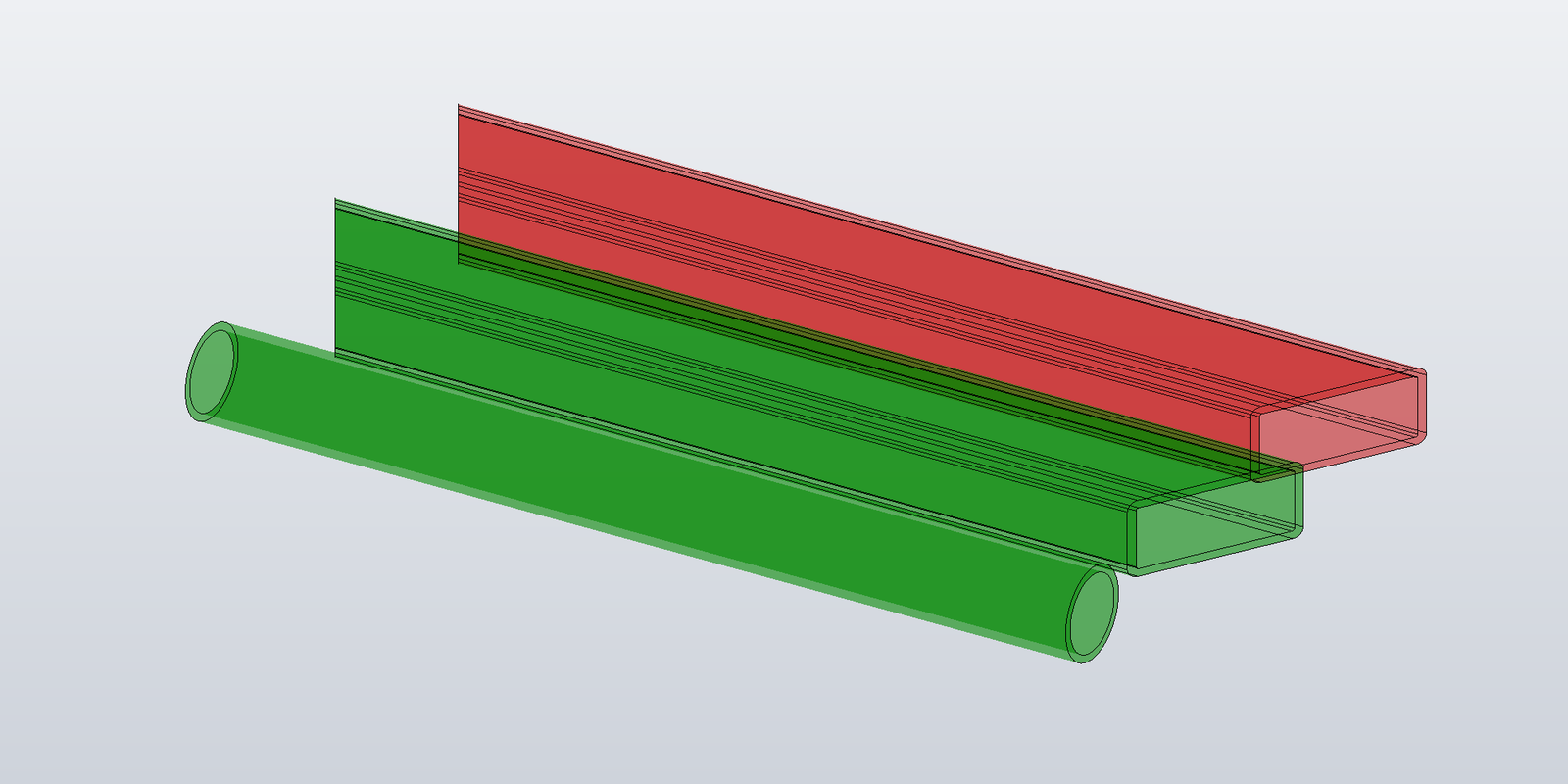
The 0.35 opacity lets the inner wall of the RHS and the far edges show through.
View.Fit() does not take client graphics into account — with an otherwise empty part the camera stays where it was. For a screenshot or a "zoom to preview" the camera has to be set from the body's RangeBox (Camera.Eye, Camera.Target, Camera.SetExtents, Camera.Apply).
Lifecycle
A ClientGraphics lives as long as its host. For InteractionGraphics that is the interaction session; when the command ends, the InteractionGraphics and everything in it is gone, and calls on cached references throw COMException. Delete graphics before the session ends, and treat cached GraphicsNode references as invalid afterwards.
foreach (GraphicsNode node in clientGraphics)
    node.Delete();
// or, for the whole collection:
clientGraphics.Delete();
view.Update();
GraphicsNode.Delete() removes one node; ClientGraphics.Delete() removes the collection. For a document-owned collection, Delete() is also how the add-in cleans up when the document closes or the add-in unloads.
Selecting on a transient preview
node.Selectable = true makes the node pickable: the selection machinery returns the GraphicsNode when the user clicks it, and the caller maps node.Id back to whatever the node represents — one beam in a multi-beam preview, say, to open a property dialog for it. For "drag a value, watch the beam follow" workflows selection isn't needed and Selectable = false is fine.
The simple update pattern is: delete the node, build a new body, add a new node. That works at human update rates. The next post covers the case where a value is being dragged and the rebuild cost shows.