
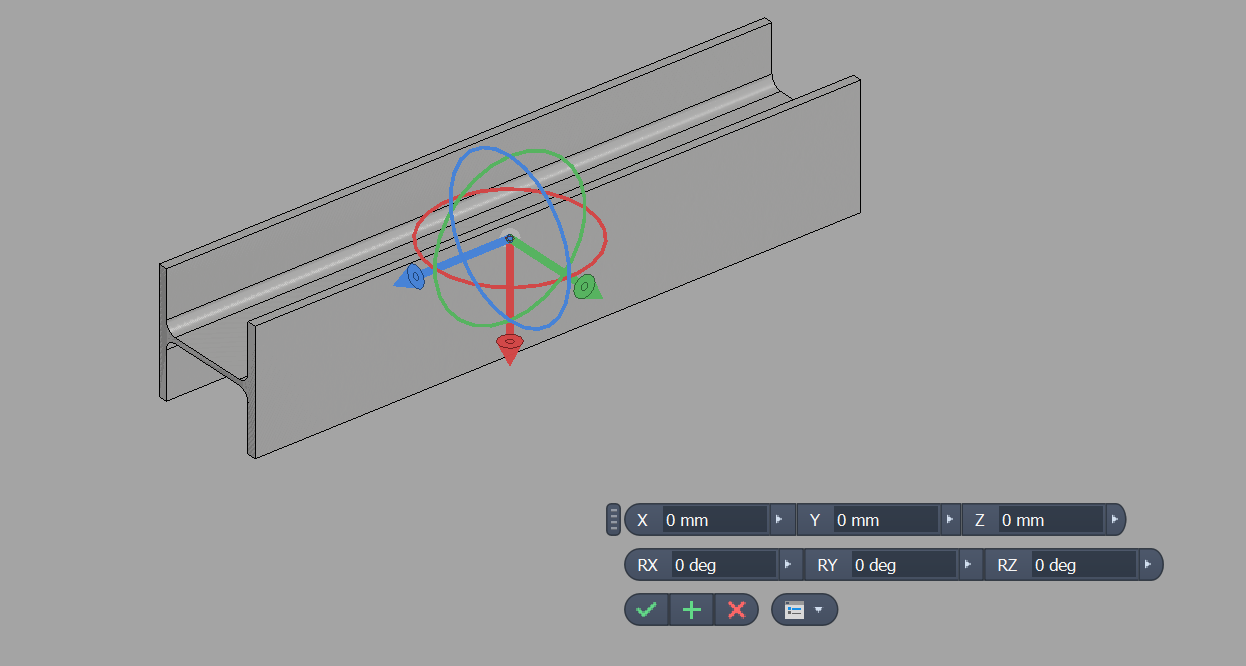
Manipulate is a free Autodesk Inventor add-in for moving and rotating a component occurrence in place. Instead of stacking Free Move and Free Rotate operations or building throwaway constraints, you can right-click an occurrence, pick Manipulate, and drive the transform by typing exact X / Y / Z and rotation values. The command is added to Inventor's linear marking menu and appears whenever the selection contains at least one component occurrence. Choosing it opens an in-canvas glyph at the occurrence's origin with three translation arrows and three rotation rings, color-coded per axis. The glyph is a passive reference — all input comes from the mini toolbar; the active arrow or ring highlights yellow so you can see which axis the field with focus is driving. A docked mini toolbar exposes the six degrees of freedom as numeric editors — X / Y / Z translation in millimeters and RX / RY / RZ rotation in degrees. As you type, a translucent live preview shows the resulting pose while the original part stays in place, so you can dial in exact values that Free Move could never snap to. Confirming with OK commits the transform to the occurrence as a single named undo entry; Cancel resets the editors to zero, and Esc dismisses the session without changes. Manipulate is free, digitally signed, and does not require a license key.
