
The Drawing Exporter is a Windows desktop application that takes a folder of SolidWorks drawings and turns it into a fully packaged delivery for production: PDFs, eDrawings, merged document sets, and ERP uploads — all from a single click.
Point the tool at an order folder and it finds every SolidWorks drawing in it, reading each one for the order number, job order number and description it already carries. The list is presented in a sortable, filterable grid so the operator can check the set before exporting. Each drawing goes out in two formats at once — a production-ready PDF and an eDrawings file for anyone without SolidWorks — into the company's standard folder structure.
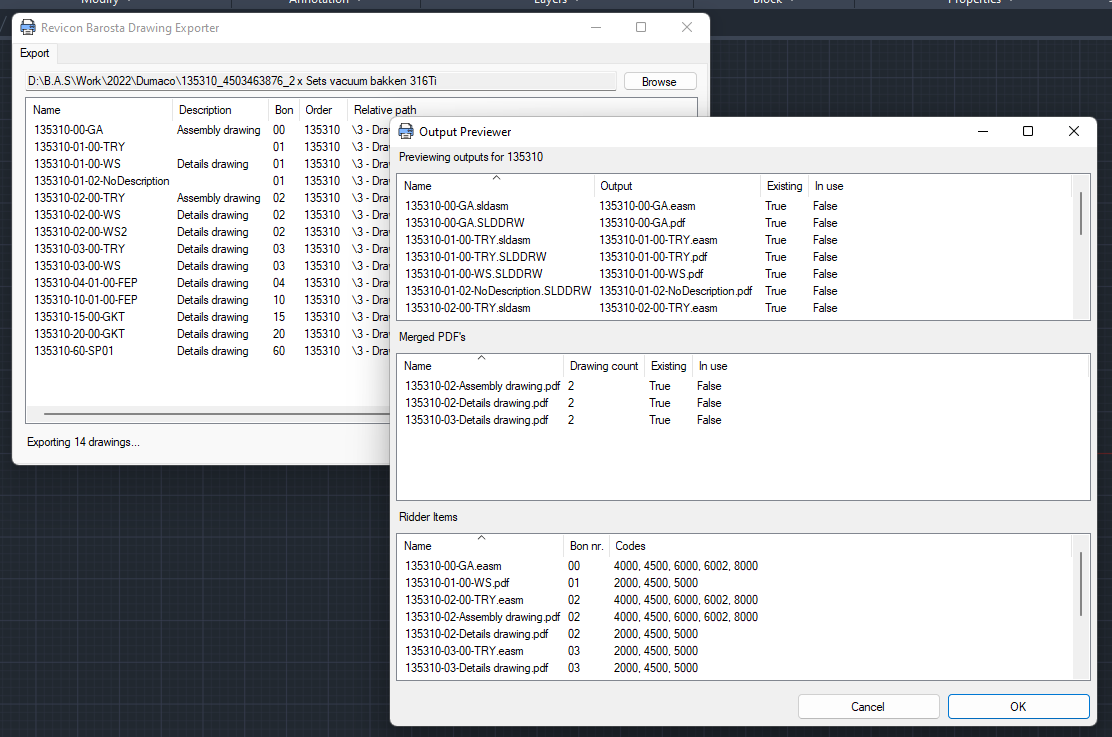
The exporter previews all outputs, merged PDFs, and Ridder uploads before running the batch.
Drawings are grouped per job order and merged into a single PDF per group — assembly drawings, detail drawings, and so on. The general arrangement drawings for the order are placed at the front of each assembly set, so the production floor receives one self-contained PDF that always opens with the overview. The loose PDFs are cleaned up once the merged file has been verified.
Before exporting, the tool checks every detail drawing for tapped holes across all its sheets. Where it finds them, it stamps a note on the sheet telling the workshop the part needs tapping. The text, its font, position and rotation all come from configuration, so the engineer never has to add the note by hand or remember which parts need one.
Once the files are on disk, the exporter files each one against the right item in the ERP under the right document code — assembly drawings, detail drawings and merged sets each have their own, set from configuration. If the ERP cannot be reached the local export still completes rather than failing outright, and connections are closed cleanly after every run.
Folder structure, document descriptions, ERP document codes, the tap-note text and placement, and which folders to skip all come from one configuration file. New output formats and codes can be added without a new build, and everything the export does is logged in enough detail to audit afterwards.
