
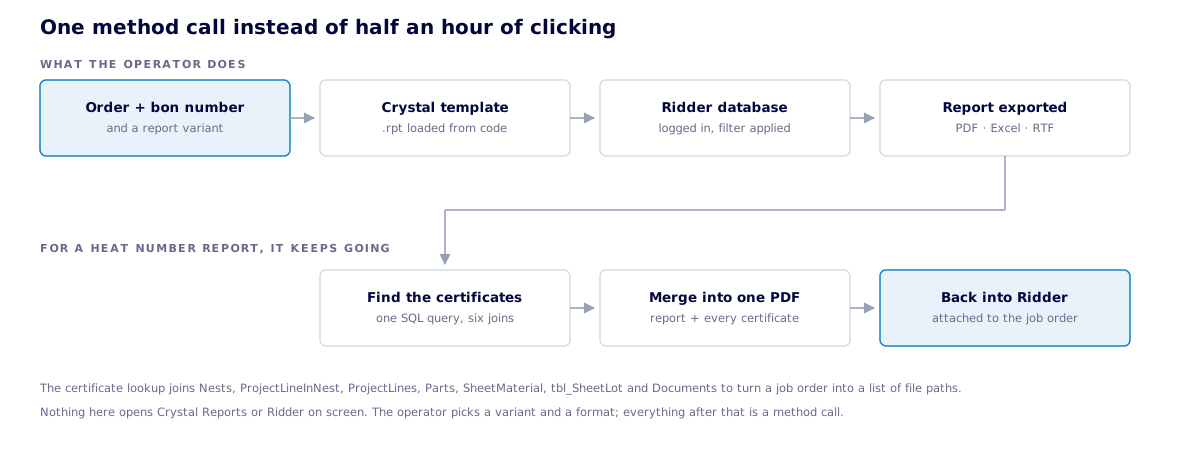
Reporting at Dumaco used to mean opening Crystal Reports by hand, picking the right template, entering the order and job order number, hunting down the matching material certificates on a shared drive, merging everything into one PDF, and then uploading the result to the right place in Ridder. This library bundles that whole flow into a single call any internal tool can make — turning half an hour of admin per order into an automatic step.
The operator supplies an order number and a format. Everything after that is automatic.
Any existing report template can be run from code: the library opens it, connects it to the ERP database with the right credentials, applies the order and job order filter every report expects, and writes the result to disk as PDF, Excel or RTF. Where a workflow needs a person in the loop, a small dialog offers the relevant report variants and output formats instead of leaving the operator to navigate Crystal itself.
Production needs more than the material summary — they need the actual certificates attached. The library runs the summary report, then looks up every material batch on the job in the ERP database and traces it to the certificate document filed against it. The summary and all certificates are merged into one deliverable, or copied side by side if a single file is not wanted, ready to ship with the order.
Once a document exists on disk it still has to end up in the right place. The library covers the cases Dumaco actually uses: filing a general report against the job order, attaching a drawing to a specific work activity under the right document code, and posting one document to both at once. Each route opens its own connection, files the document, and shuts the connection down afterwards so stale sessions never accumulate.
Some workflows finish by emailing the report — to a customer, to a supplier, to QA. The library opens an Outlook draft with the recipients, subject, body and attachments already filled in, leaving the operator to read it over and click Send. Outlook stays in the loop for tracking and signatures rather than being bypassed by a hidden background send.
This is not a standalone tool but a shared component the rest of the Dumaco automation suite builds on — the drawing exporter, the bending automation and various smaller tools all call into it whenever they need to produce a report or file a document. Keeping the database queries, the credentials and the connection handling in one place means a schema change or a new report variant is a single update for every tool that depends on it.
