

Part 1 was about reading Frame Generator's data. Part 2 was about noticing when a user has edited a frame. This part is about what happens to your state when Frame Generator gets done — because a "profile change" in Inventor's UI is, under the hood, an occurrence destruction-and-replacement, and almost everything that pointed at the old occurrence is now dead.
To keep it concrete, this post follows one use case: you've constrained a part of your own to a frame beam, and you want those constraints to re-resolve automatically when the user swaps that beam to a different profile — so the part stays attached instead of breaking.
Specifically, when a user changes a beam from an HEA200 to an HEA240:
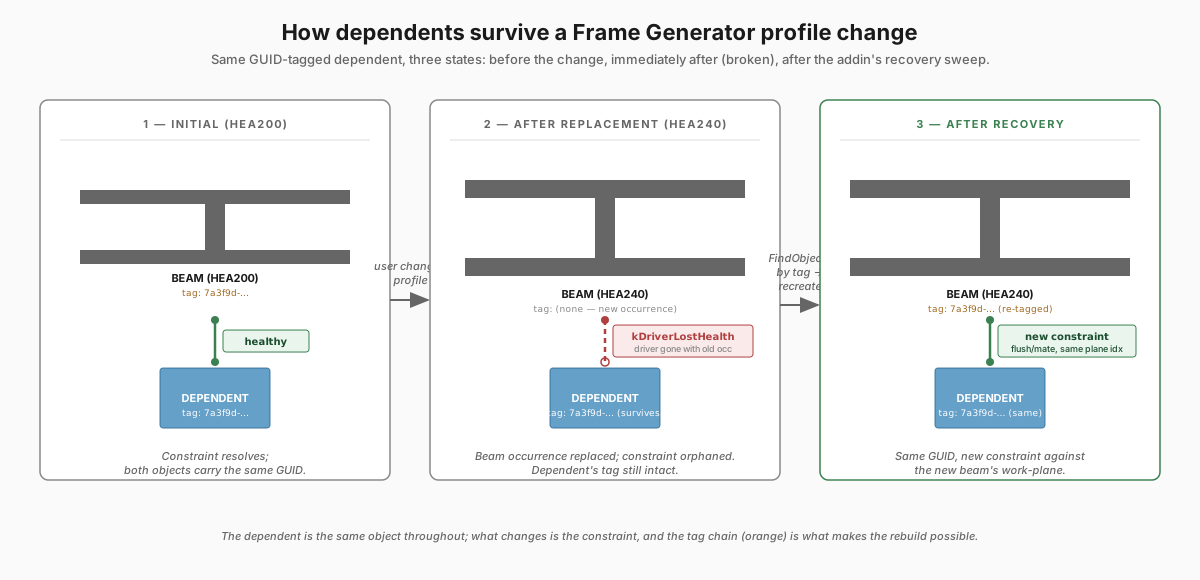
ComponentOccurrenceinstances are torn down. Anything you cached against them is a dangling pointer.ReferenceKeys that resolved to the old occurrence returnnullfromBindKeyToObject.- Assembly constraints that referenced geometry on the old occurrence enter
HealthStatusEnum.kDriverLostHealth— Inventor's way of saying "this constraint is broken; the user will see a red icon in the browser until you fix it or remove it". - Custom attribute sets you stored on the old occurrence are gone. Sets you stored on surviving objects (like the new beam, or the dependent part) come through fine.
Your addin has to repair all of that. The approach here: tag every dependent thing you create with a GUID-keyed attribute, so that when the underlying anchor dies you can find your dependents purely by attribute search and rebuild them against the new geometry.
BindKeyToObject returns null after a profile change
Inventor reference keys are persistent handles to model objects — opaque byte arrays you resolve back to a live object through the document's ReferenceKeyManager, as covered in Part 1. They survive save/load, they survive most edits, and as a result they're the obvious thing to cache when you need to remember "which beam does this dependent belong to?". One pattern is to stringify the parent beam's key with KeyToString and stash it in the dependent's own attribute set, then read it back when you need the beam again:
// Captured at placement with ReferenceKeyManager.KeyToString, the parent
// beam's reference key lives as a string in the dependent's attribute set.
var keyString = dependent.AttributeSets[DependentAttributeSetName]["BeamReferenceKey"]
                         .Value.ToString();

byte[] key = null;
assembly.ReferenceKeyManager.StringToKey(keyString, ref key);
That works perfectly until somebody changes the beam profile. Then the bind returns null:
// bind through the same context the key was captured in
var beam = assembly.ReferenceKeyManager.BindKeyToObject(ref key, contextId, out _)
           as ComponentOccurrence;

// When a beam is changed to a 'different' section, the occurrence is new,
// so the key captured against the old occurrence no longer binds.
if (beam == null) { return; }
A null here doesn't mean the file is corrupt. It means Frame Generator destroyed the occurrence the key pointed to and made a new one. This is exactly why Part 2's event sequence has to capture dependent-to-beam mappings before OnDelete completes — once the old beam is gone, no amount of reference-key recovery will get it back.
After replacement, the addin re-derives the beam from the new occurrence (which you tracked in OnNewOccurrence) and writes a fresh BeamReferenceKey into the dependent's attribute set. The reference-key chain is rebuilt forward, not recovered backward.
kDriverLostHealth and broken constraints
A broken reference key at least fails cleanly: you re-derive the beam and rebuild the key forward. Constraints don't give you that. A constraint references specific geometry — a face, an edge, a work-plane — on a specific component definition. When the underlying part document changes (because the beam's profile changed), the constraint can no longer resolve the geometry it was built against. Inventor's response is to set HealthStatus to kDriverLostHealth and leave the constraint sitting in the browser as a red icon.
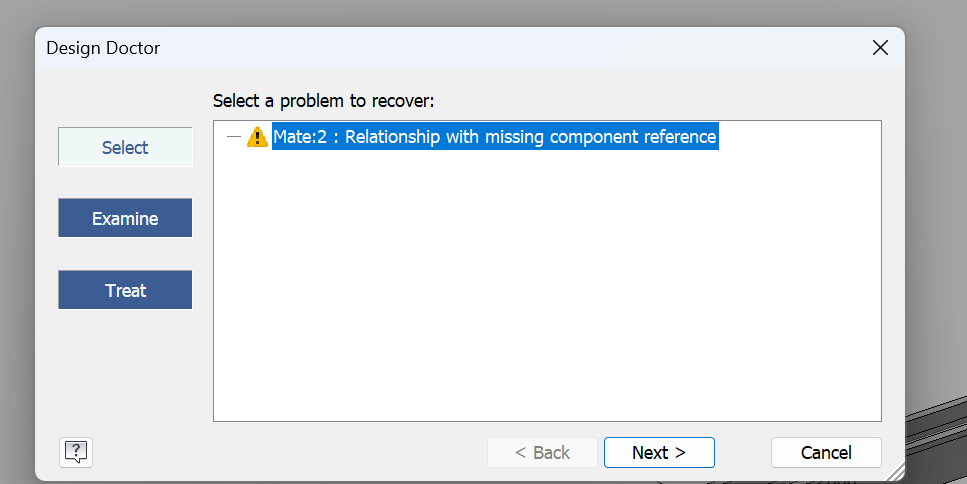
A kDriverLostHealth constraint can be repaired — Inventor's Design Doctor walks a user through reselecting the lost geometry. What Inventor doesn't expose is an API for that rebind: the constraint's GeometryOne/GeometryTwo are read-only and there's no Redefine method. So an addin recovering automatically — with no user in the loop to drive the wizard — ends up mimicking what the Design Doctor does, in code: delete the broken constraint and recreate it against the equivalent geometry on the new definition. You only do this for constraints you created yourself — and crucially, ones you built against geometry you control: a small fixed library of named work-planes whose index survives regeneration. A user's constraint can be pinned to any geometry they picked — some face or edge — with no stable handle to re-identify after the profile changes, so rebinding it automatically is a much harder problem (which is what the Design Doctor's manual reselection exists for). That's why you tag your own, find them, and leave the user's untouched.
The same fragility applies to geometry you anchor on, not just the user's. If your dependent is mated to a face of the beam rather than an origin work-plane, recovery gets much harder: an origin work-plane is re-found by its index, which survives regeneration, but after a profile change the face is a different topological entity with no equivalent handle. You can attempt to re-find it heuristically — hit-test a stored model point with PartComponentDefinition.FindUsingPoint, or build a fingerprint from the face's normal plus a point known to lie on it — but a changed profile can move, split, merge or reorder the very faces you're matching against, so no such heuristic resolves correctly 100% of the time. Getting face recovery to behave is a deep enough rabbit hole that it's probably a future post of its own. Constraining to the origin work-planes sidesteps the problem entirely: there's nothing to re-identify, only an index to look up.
Which means: before you create a custom constraint, you need to record enough metadata on it that you can recreate it from scratch later.
// When placing a constraint, tag it with enough metadata to rebuild later:
attbSet.Add("ConstraintGeometry", ValueTypeEnum.kIntegerType, (int)constraintGeometry);
attbSet.Add("ConstraintType",     ValueTypeEnum.kIntegerType, (int)constraintType);
attbSet.Add("DependentID",        ValueTypeEnum.kStringType, dependentId);
ConstraintGeometry is an enum whose integer value is the index of a work-plane on the underlying part definition (if your dependent is authored against a small fixed library of named work-planes, the index is stable across regenerations). ConstraintType records flush vs mate. DependentID is a GUID stored both here and in the parent dependent's own tracking attribute set, so you can find all constraints belonging to a given dependent with one attribute-manager query.
Recovery: search, recreate, retag
The actual recovery routine ends up being short. After the replacer has substituted a new dependent part, it sweeps every constraint with the tagged attribute set and rebuilds any in kDriverLostHealth:
private void FixBrokenConstraints(BeamReplacement replacement, string dependentId)
{
    var attbMan = assembly.AttributeManager;
    ObjectsEnumerator taggedConstraints =
        attbMan.FindObjects(ConstraintAttributeSetName, "ConstraintGeometry");

    foreach (AssemblyConstraint constraint in taggedConstraints)
    {
        if (constraint.HealthStatus != HealthStatusEnum.kDriverLostHealth) continue;

        var attrs = constraint.AttributeSets[ConstraintAttributeSetName];
        if (attrs["DependentID"].Value.ToString() != dependentId) continue;

        var geo  = (ConstraintGeometry)attrs["ConstraintGeometry"].Value;
        var type = (ConstraintType)attrs["ConstraintType"].Value;

        var beamCompdef      = (PartComponentDefinition)replacement.BeamOccurrence.Definition;
        var dependentCompdef = (PartComponentDefinition)replacement.DependentOccurrence.Definition;

        constraint.Delete();

        var beamPlane      = beamCompdef.WorkPlanes[(int)geo + 1];
        replacement.BeamOccurrence.CreateGeometryProxy(beamPlane, out object beamPlaneProxy);
        var dependentPlane = dependentCompdef.WorkPlanes[(int)geo + 1];
        replacement.DependentOccurrence.CreateGeometryProxy(dependentPlane, out object dependentPlaneProxy);

        AssemblyConstraint c = type == ConstraintType.Flush
            ? (AssemblyConstraint)assembly.ComponentDefinition.Constraints.AddFlushConstraint(dependentPlaneProxy, beamPlaneProxy, 0)
            : (AssemblyConstraint)assembly.ComponentDefinition.Constraints.AddMateConstraint (dependentPlaneProxy, beamPlaneProxy, 0);

        // Re-tag the new constraint so the next edit can find it too
        var newAttrs = c.AttributeSets.Add(ConstraintAttributeSetName);
        newAttrs.Add("ConstraintGeometry", ValueTypeEnum.kIntegerType, (int)geo);
        newAttrs.Add("ConstraintType",     ValueTypeEnum.kIntegerType, (int)type);
        newAttrs.Add("DependentID",        ValueTypeEnum.kStringType, dependentId);
    }
}
The two key moves:
AttributeManager.FindObjectswith the attribute-set name as the first argument is how you query for "every assembly object I've ever tagged with this set". This is much faster than walkingAllLeafOccurrencesand inspecting attributes per object. Use it whenever you have a non-trivial number of tagged objects.CreateGeometryProxyon the new occurrence's freshly-resolved work-plane is what makes the new constraint stick. The proxy is the assembly-context handle for a piece of part-definition geometry; without it you'd be passing raw work-plane references that aren't valid in the assembly's coordinate frame.
The new constraint is re-tagged with the same GUID and same metadata so that the next profile change will find it just as readily. The chain is self-healing as long as it isn't broken — and the chain is just Id strings stored in attribute sets, so it's almost impossible to break.
What survives a Frame Generator edit, and what doesn't
After two years of building on this, here's the cheat-sheet I keep in my head:
| Thing | Survives a profile change? |
|---|---|
ComponentOccurrence of the replaced beam |
No — torn down, even the variable identity |
ComponentOccurrence of dependent (non-frame) parts |
Yes |
ReferenceKey to the replaced beam |
No — BindKeyToObject returns null |
| Custom attribute sets on the replaced beam | No — gone with the occurrence |
| Custom attribute sets on dependent parts | Yes |
| Assembly constraints touching the replaced beam | Sort of — survive in kDriverLostHealth, must be rebuilt |
The frame assembly's Frame.Skeletons XML |
Yes — rewritten by Frame Generator |
MonikerForCC on the frame member definition |
Changes — the whole point of the edit |
FrameMemberID on the path entry |
Yes — Frame Generator preserves frame-local IDs across profile swaps |
Design lesson: anything you want to outlive a Frame Generator edit needs to be either (a) anchored on a non-frame object, or (b) discoverable from scratch by attribute search, with enough metadata in the attributes to fully recreate the dependency. Option (b) is more plumbing but more robust — there's no way for the chain to break silently.
Closing notes
This three-part series is what I wish someone had written before I started building against Frame Generator. Once you understand its data model and event flow, building on it is workable — the attribute-set layer is reasonably stable, the moniker is a real durable identifier, and the assembly-event story is consistent if not documented.
It isn't a documented contract, so treat the magic strings as load-bearing, treat kBefore/kAfter ordering as part of your design, tag everything you create with GUIDs so you can find it without object identity, detach your event handlers before mutating the assembly, and log the transaction DisplayNames in dev builds. "Change Frame" has held steady for as long as I've built against it, so this is more precaution than expectation — but if Autodesk ever does rename it, you now know exactly what it is and where it shows up.
A runnable demo add-in with the patterns from this series is on GitHub: Basnederveen/frame-generator-demo.
If you're building something against Frame Generator and run into something that isn't in this series, drop me a line — I'd love to compare notes.
Previous: Part 2 — Tracking Edits · Part 1 — The Data Model