

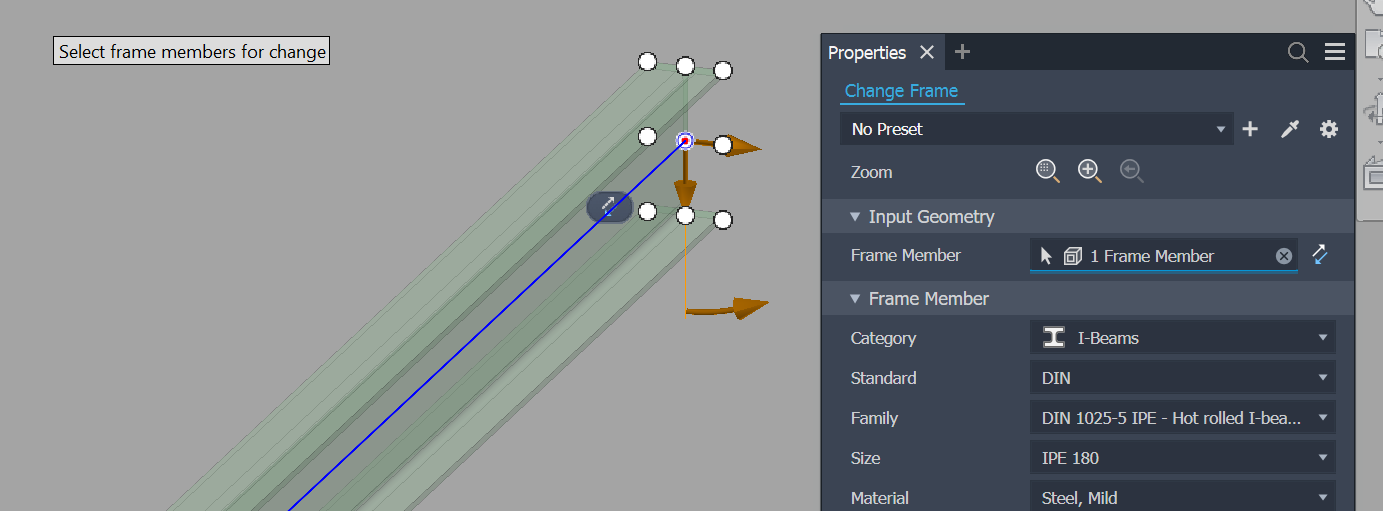
Part 1 covered how to read Frame Generator's data — the com.autodesk.FG attribute set, the skeleton XML, the three IDs, and the proxy/native context detail. This part covers the other half of the problem: how do you know when the user has edited a frame, so your addin can react?
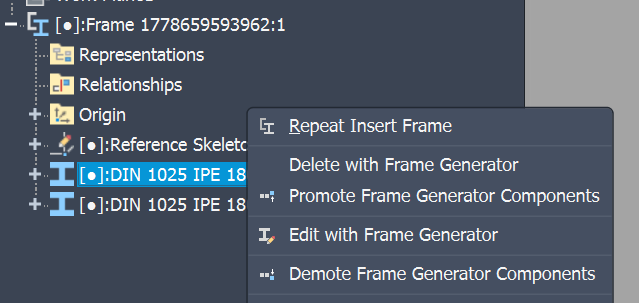
There is no OnFrameEdited event. There is no OnFrameMemberReplaced. Frame Generator dispatches its work through the same generic assembly events any other Inventor command uses, which means your addin has to recognise the pattern out of the noise. The pattern looks like this:
User clicks "Edit with Frame Generator" or "Change" → an
AFG_*command activates → assembly-levelOnDeletefires for each replaced beam →OnNewOccurrencefires for each replacement →OnOccurrenceChangefires with"Replace"in the context map → a transaction commits withDisplayName == "Change Frame"→ only then is it safe to act.
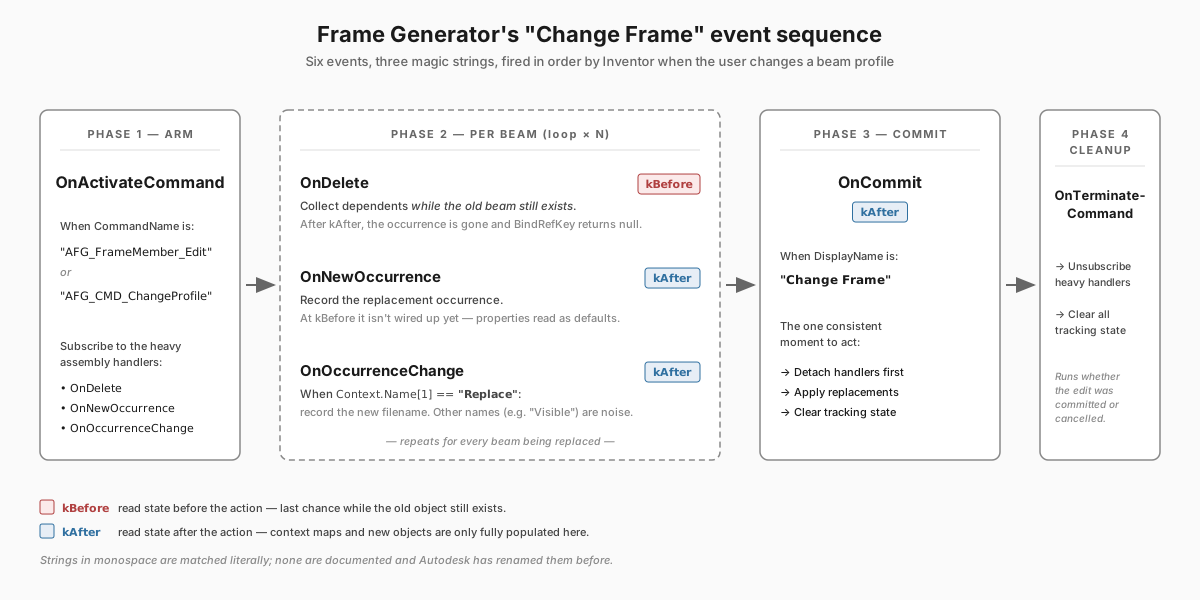
Six events, three magic strings, and a state machine. Let's walk through it.
Arm your handlers when the user enters frame-edit mode
The two command names Frame Generator uses for member edits are AFG_FrameMember_Edit and AFG_CMD_ChangeProfile. You can discover them by logging every OnActivateCommand while clicking around in Inventor — they aren't in the docs.
The strategy: subscribe to OnActivateCommand / OnTerminateCommand always, but only subscribe to the heavier assembly events while one of those frame commands is active. Otherwise every nudge of an unrelated occurrence drags your handlers in.
private void SetEditingFrameStatus(string CommandName, bool editingFrame)
{
    if (CommandName == "AFG_FrameMember_Edit" | CommandName == "AFG_CMD_ChangeProfile")
    {
        if (editingFrame)
        {
            assemblyEvents.OnOccurrenceChange += AssemblyEvents_OnOccurrenceChange;
            assemblyEvents.OnNewOccurrence   += AssemblyEvents_OnNewOccurrence;
            assemblyEvents.OnDelete          += AssemblyEvents_OnDelete;
        }
        else
        {
            assemblyEvents.OnOccurrenceChange -= AssemblyEvents_OnOccurrenceChange;
            assemblyEvents.OnNewOccurrence   -= AssemblyEvents_OnNewOccurrence;
            assemblyEvents.OnDelete          -= AssemblyEvents_OnDelete;
        }
    }
}
This is also the right place to clear stale tracking state on terminate (more on that further down).
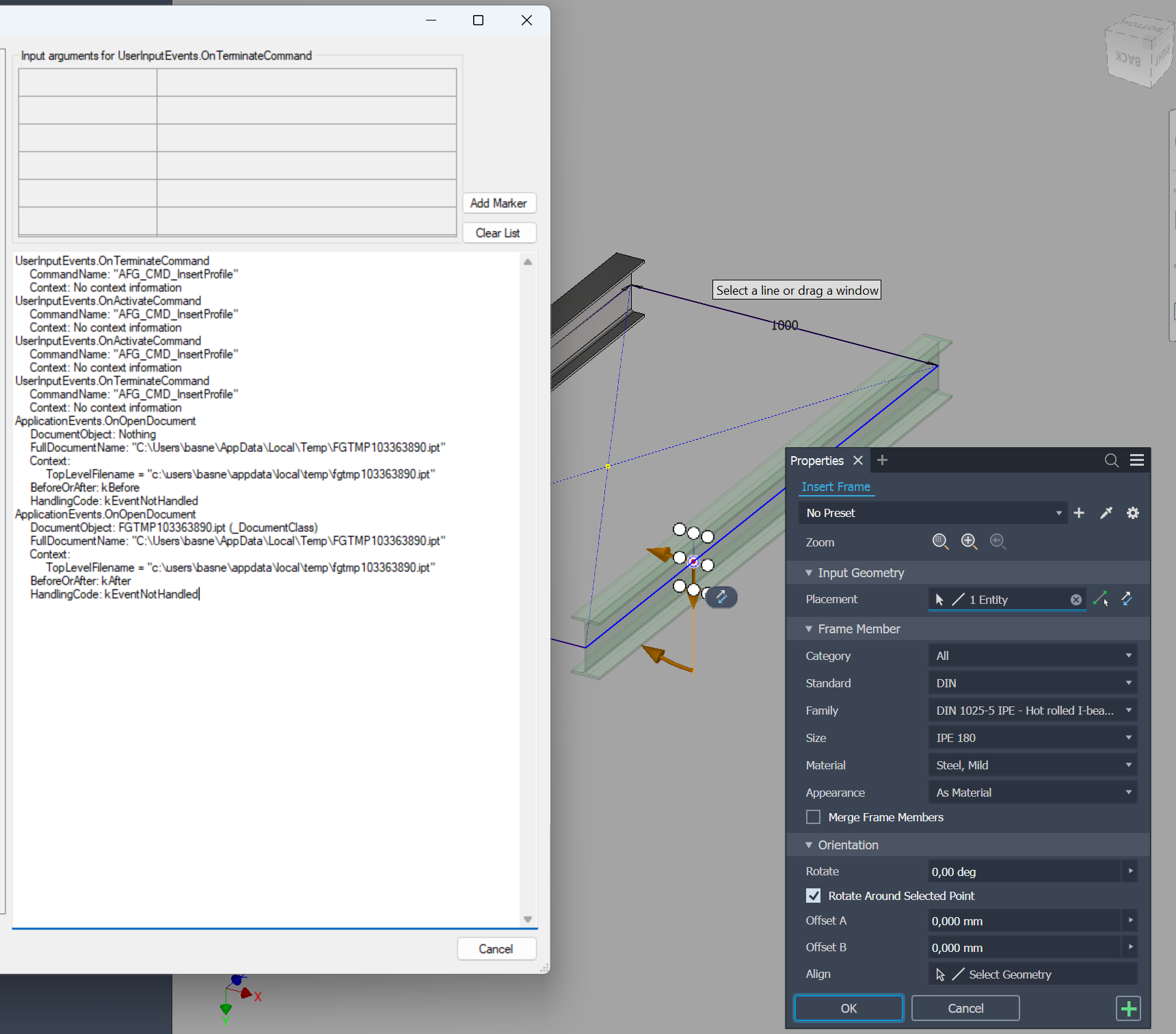
What this looks like in practice — events captured by an event-viewer add-in during a Frame Generator operation (Insert in these captures; the Change flow uses different command names but the same lifecycle). The viewer was cleared between the two snapshots:
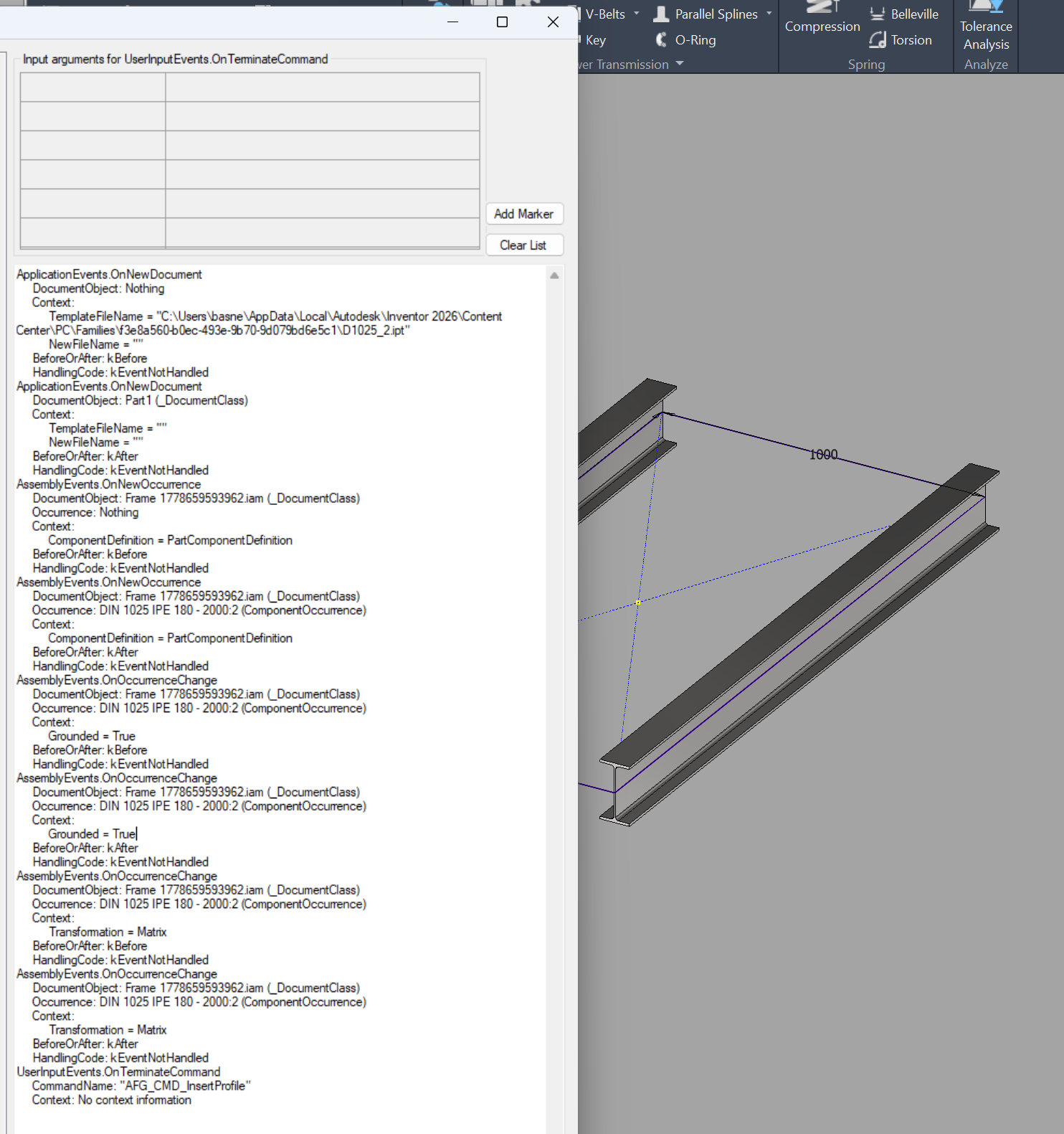
kBefore collects, kAfter reacts
Inventor's events fire twice — once before the underlying action (EventTimingEnum.kBefore) and once after (kAfter). For Frame Generator edits the rules are not negotiable:
-
OnDelete— must read state inkBefore. When Frame Generator deletes the old beam occurrence, anything that depended on it (your addin's per-beam state, references held in your own attribute sets, constraints anchored to it) becomes orphaned. You need to capture those dependents while the old beam still exists. BykAfter, the occurrence is gone and your reference key won't bind. -
OnNewOccurrence— must read state inkAfter. The new occurrence isn't fully wired up atkBefore; properties you read may be defaults or nulls. Wait until after. -
OnOccurrenceChange— must read theReplacepayload inkAfter. The context name-value-map only contains the new filename after the change is committed at the occurrence level.
// excerpts
private void AssemblyEvents_OnDelete(_Document doc, object Entity, EventTimingEnum BeforeOrAfter, ...)
{
    if (BeforeOrAfter == EventTimingEnum.kBefore)
    {
        var occ = (ComponentOccurrence)Entity;
        var occInFrameAssyContext = occ.AdjustOccurrenceToContext(frameAssy);

        // Read whatever your addin needs off the old beam *now* — at kBefore it
        // still exists and its reference key still binds. By kAfter it's gone.
    }
    HandlingCode = HandlingCodeEnum.kEventHandled;
}

private void AssemblyEvents_OnOccurrenceChange(_AssemblyDocument doc, ComponentOccurrence Occurrence,
    EventTimingEnum BeforeOrAfter, NameValueMap Context, ...)
{
    if (BeforeOrAfter == EventTimingEnum.kAfter && Context.Name[1] == "Replace")
    {
        var newBeamFilename = Context.Value["Replace"].ToString();
        // the new beam's file — record the replacement and arm OnCommit so you
        // act once the whole transaction lands
    }
    HandlingCode = HandlingCodeEnum.kEventHandled;
}
Notice the Context.Name[1] == "Replace" test — OnOccurrenceChange fires for many reasons. The context map is your only signal as to which one. Other names you'll see include "Visible" (turning visibility on/off in frame edit mode). Only "Replace" is the one you want.
The linchpin is a transaction-name string
This is the part that makes the whole thing fragile. Frame Generator wraps a profile change in a single Inventor transaction. After all the per-occurrence delete/new/change events fire, the transaction commits — and that is your one signal that everything is consistent and your addin can finally do its work.
How do you recognise the right transaction? By matching its DisplayName against the literal string "Change Frame":
private void TransactionEvents_OnCommitNew(Transaction TransactionObject, NameValueMap Context,
    EventTimingEnum BeforeOrAfter, out HandlingCodeEnum HandlingCode)
{
    if (TransactionObject.DisplayName == "Change Frame"
        && BeforeOrAfter == EventTimingEnum.kAfter)
    {
        // detach handlers BEFORE acting, so your own edits don't re-trigger you
        transactionEvents.OnCommit       -= TransactionEvents_OnCommitNew;
        assemblyEvents.OnDelete          -= AssemblyEvents_OnDelete;
        assemblyEvents.OnNewOccurrence   -= AssemblyEvents_OnNewOccurrence;

        // every per-beam event has fired and the model is consistent — this is
        // the one safe place to do your work, then reset any per-edit state
    }
    HandlingCode = HandlingCodeEnum.kEventHandled;
}
Two things worth flagging:
- Detach handlers before you touch the assembly. Whatever you do here starts its own transactions; if
OnCommitwere still wired, you'd trigger yourself recursively the moment your first edit lands. - The string match is unversioned. If Autodesk renames the transaction in a future Inventor release (the
AFG_*commands were renamed once, around 2018), the flow goes silent. The addin doesn't crash — it just stops noticing frame edits. Logging every transactionDisplayNamein dev builds is cheap insurance for this kind of magic-string dependency.
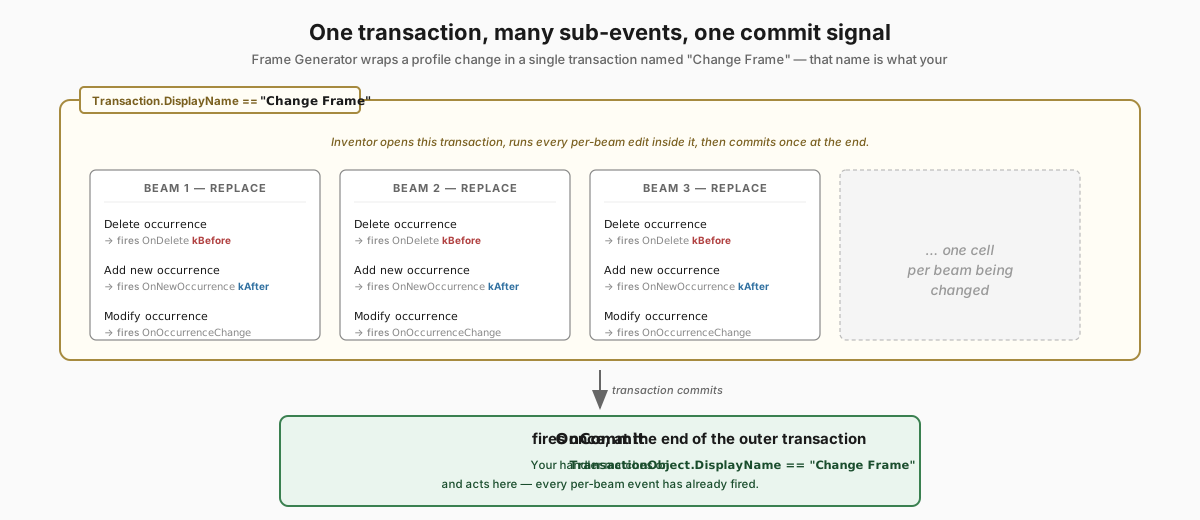
Undo cleanup is your job
Inventor's undo doesn't unwind your addin's in-memory state. If the user starts an edit, your handlers stash state for it, then hit Esc without committing — and on the next edit that stale state comes along for the ride and gets acted on, even though the beams it belonged to never changed.
The fix is simple but easy to forget: clear every tracking collection when the frame command terminates:
private void UserInputEvents_OnTerminateCommand(string CommandName, NameValueMap Context)
{
    SetEditingFrameStatus(CommandName, false);

    // the command ended — committed OR cancelled with Esc. Reset any per-edit
    // state you stashed, so a cancelled edit can't leak into the next one.
}
And again at the end of OnCommit once the work is done. Belt and braces — the cost of clearing is zero, the cost of not clearing is ghost references.
The state machine, end to end
If you read all of the above and still aren't sure of the order, here's the loop your handlers form:
OnActivateCommand("AFG_FrameMember_Edit" | "AFG_CMD_ChangeProfile")→ armOnDelete/OnNewOccurrence/OnOccurrenceChange.- For each beam being replaced:
OnDelete kBefore→ read what you need off the old beam (it still exists here, so its reference key binds).OnNewOccurrence kAfter→ record the new occurrence.OnOccurrenceChange kAfterwithContext.Name[1] == "Replace"→ record the replacement; armOnCommit.
OnCommit kAfterwithTransactionObject.DisplayName == "Change Frame"→ detach handlers, do your work, reset state.OnTerminateCommand→ reset state again, detach the heavy handlers, return to idle.
Six events, three string matches, and a state machine you write yourself. It works reliably once the sequence is right; the fragility is in those string literals, since they're unversioned and undocumented. Worth backing with tests that would catch a future Autodesk rename.
Previous: Part 1 — The Data Model Next: Part 3 — Surviving Replacement (coming soon). Now we know when a beam was replaced. Most of the things that pointed at the old beam — reference keys, assembly constraints, our own attribute sets — are dead. How do you bring them back from the grave?